
How to create a new Repunzel account with a new email address
Setting Up Your New Repunzel Email Account
Hey there! Looking to use a different email with Repunzel? This quick guide will have you up and running in no time! Here's how:
Step 1: Visit Our Website
Pop over to repunzel.com (the link will open in a new tab so you won't lose this guide!)
Step 2: Find the Magic Button
Look for the "Get repped today" buttons on the page. They're pretty hard to miss - just click one and you'll see the Checkout window appear!

Step 3: Connect with Google
Here's where the magic happens:
- Click on the "Continue with Google" button
- Choose the email address you want to use for your submissions going forward
- Sign in with that Google account if prompted
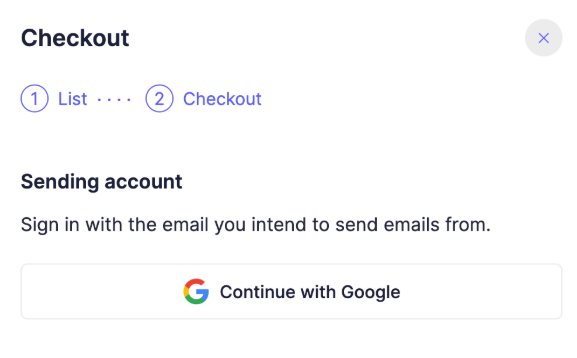
- Sit back and watch as your new account takes shape! ✨
Step 4: You're Almost There!
Once it says "You're all set!", you can go ahead and close the payment window.
Important Tip: 💡 There's no need to complete any purchase at this point - your account is already created!
What's Next?
Now that you've got a new Repunzel account, just let us know you're all set up!
You can:
- Reply in the chat if you're already talking with us
- Send a quick "Hello from my new account!" email to hello@repunzel.com.
We're excited to have you on board with your new account! If you have any questions along the way, reach out anytime to our friendly support team at support@repunzel.com. we're always here to help!